

Get this app from Google Play Store for automatic updates & security. Use APK if Play Store is unavailable in your region or you need an older version.
Screenshots

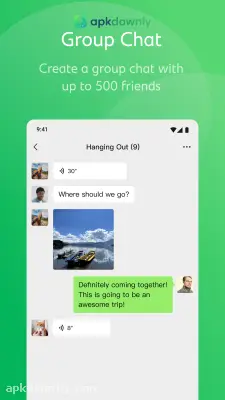


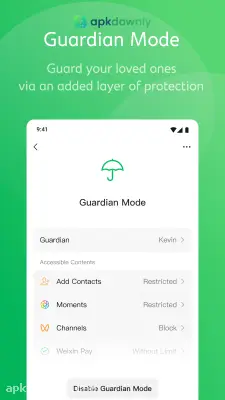
Screenshots from Google Play
More in Communication
View all →


What's new
About this app
WeChat is a messaging and social networking platform developed by Tencent. It started as a basic texting tool. Today, the WeChat app has over one billion active users. It allows you to chat with family, make international video calls, and pay for coffee. People rely on it for their daily conversations. And if you have friends, relatives, or business partners in China, this platform is a must-have. Let's see what it has to offer and how it works.
What Makes This Platform Great
Unlike other apps where you have to open separate apps for making phone calls, hanging out online, and paying bills, with this platform you can do it all in one. Just open one window and text your coworker. Then you tap another button to post a picture of your dog. But it goes beyond standard social networking. The software has mini-programs built inside it. These enable you to order food or book a taxi without needing to install additional software on your phone.
Key Features of the WeChat Application
Here's an overview of what you receive when you install the WeChat apk:
Voice and Video Calls: High-quality calls can be initiated with anyone worldwide. Group video calls accommodate up to 15 participants at once.
Massive Group Chats: Text groups can be created with as many as 500 members. This is useful for organizing large events or connecting extended families.
Moments: This serves as a personal feed. Photos, short videos, and text updates can be posted for contacts to view and comment on.
Message Recall: We all make typing mistakes. You have a two-minute window to recall and delete a text, document, or picture you sent by accident.
Mobile Payments: Weixin Pay is built directly into the system. You can link a card and scan QR codes to pay for items at stores. Digital red envelopes containing money can also be sent to friends.
Real-Time Location Sharing: Your exact location on a map can be shared with a single tap. This simplifies finding friends in crowded places.
How to Download WeChat and Get Started
Setting up your profile takes a few minutes. Follow these simple steps to download WeChat and create your account:
- Get the software: Go to the Google Play Store or Apple App Store and search for the name. If you can't access those stores, visit apkdownly.com to grab the latest file.
- Install the file: Tap the install button. If you're using the downloaded file, go into your phone settings to permit installations from unknown sources, then tap the file to install it.
- Sign up with your number: Launch the program and choose the sign-up option. A valid mobile phone number is required to register. Input your digits and wait for a verification code sent via SMS.
- Complete security verification: A momentary security check is needed. You may need to drag the given puzzle pieces to specific positions. Besides, sometimes, WeChat may ask for a scan of a QR code by an existing user to whom you are registered.
- Set up your profile: Set your display name and profile picture. You can sync your contacts and start sending messages right away.
Go to the settings page to change your privacy settings as your profile is set up. It is possible to restrict some friends from viewing your Moments or turn off the positioning function. Make sure to update your WeChat app in a timely manner so that your calls and payments can be secured.





