
Get this app from Google Play Store for automatic updates & security. Use APK if Play Store is unavailable in your region or you need an older version.
Screenshots


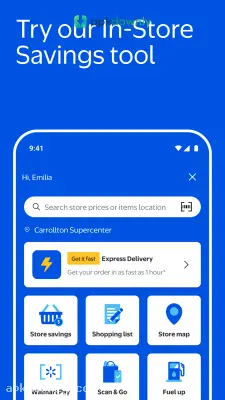





Screenshots from Google Play
More in Shopping
View all →


About this app
Walmart
The Walmart app displays your nearby store’s inventory directly on your device. Browse the precise products available on the shelves nearby. Dealing with packed aisles during a busy Saturday morning quickly becomes tiresome.
This application lets you handle your online shopping from your couch instead.
Simply select a couple of options to add milk, fresh produce, and trash bags. Gradually assemble your cart throughout the week. The system remembers what you buy the most. Reordering your usual household staples takes maybe ten seconds. Millions use it to skip the checkout lines entirely.
What the Walmart app offers
The online interface mirrors the actual store. Check the grocery area to confirm whether your preferred coffee is available. Live inventory updates stop you from taking an unnecessary trip. The interface updates inventory counts constantly. You can also check electronics for a phone charger or browse hardware for automotive supplies.
But it covers more than just retail goods. The system links straight to the pharmacy. Request prescription refills for your children directly from the primary menu.
Receive an alert as soon as your medications are prepared. This organizes your tasks efficiently. You may also create distinct lists to separate holiday purchases from everyday meal preparation.
Features that truly conserve time
- Grocery pickup: Reserve a pickup window and drive into a designated numbered spot. An employee delivers your packed groceries and places them in your vehicle’s trunk. There’s no need to leave your car at all.
- Store maps: Searching a large store for a particular spice can be extremely annoying. The application supplies a layout of your local store and directs you to the precise aisle.
- Walmart Pay: There’s no necessity to search for a traditional wallet. The integrated scanner enables payment for purchases at the checkout using your smartphone display.
- AI search helper: An embedded assistant called Sparky responds to straightforward inquiries. It assists in locating particular items for a gathering and retrieves summary reviews so you understand precisely what you’re purchasing.
How to begin
Launching the app requires just a minute.
- Obtain the APK from apkdownly.com and install it on your Android device. Ensure your phone’s settings allow installations from external sources.
- Sign in to your existing account or register a new one using an email.
- Enable location services to locate the nearest store nearby.
- Browse the various departments and select the add option to place products into your online cart.
- Choose a time slot to collect the bags in person or arrange for home delivery.
Tracking your membership benefits
Shoppers who pay for the premium subscription manage their perks here. Members get a special mobile scanning tool to use inside the building.
Simply stroll along the aisle, scan item barcodes via your camera, and complete payment straight on your phone. You walk right past the main checkout lanes. Plus, there’s no waiting for a printed receipt. The application tracks your fuel station discounts on its own. For frequent fuel purchasers, these automatic savings accumulate quickly.
Verify your preferred payment options within the Walmart app prior to placing a big grocery pickup order to prevent any processing holdups.