

Parallel Space
Get this app from Google Play Store for automatic updates & security. Use APK if Play Store is unavailable in your region or you need an older version.
Screenshots
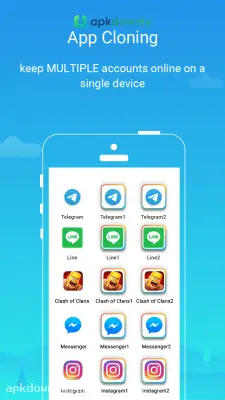


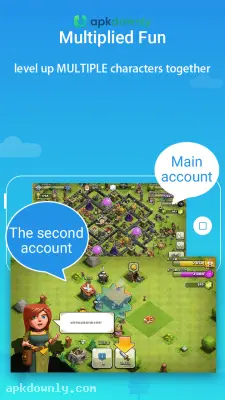

Screenshots from Google Play
More in Tools
View all →


About this app
Parallel Space
Parallel Space is an application that creates an independent virtual environment directly on your Android device. It lets you run two different user accounts for the exact same app at the exact same time. If you need to manage separate work and personal profiles, getting the Parallel Space APK stops the frustration of constantly logging in and out of your accounts.
The software basically acts like a second phone hiding inside your current hardware. The cloned apps run completely on their own. This approach keeps the statistics, pics, and messages from your second account from blending together with your primary installation. It takes up little or no storage space. And it doesn't require you to root your device.
Core Features of the Parallel Space APK
The interface is built to handle the apps you already use every day. It supports most standard social platforms and mobile games right out of the box.
Run Multiple Social Accounts. Using two WhatsApp or Facebook profiles usually requires carrying two physical phones. This tool lets you build a clone right next to the original application. You can message clients on a business number while texting family on your personal number. Both accounts stay active. And notifications for both profiles arrive on your screen normally.
Manage Separate Game Profiles: Gamers frequently build multiple accounts to farm resources or try different character classes. You can clone your game and keep both save files running on one device. You just switch between the two profiles from the app menu instead of deleting your progress and signing back in.
Hide Private Applications. Sometimes you want to keep specific apps away from anyone who might borrow your phone. The built-in incognito installation feature hides your cloned apps from your main Android app drawer. You can also set a secure password for the virtual space. That way, your private messages stay entirely out of sight.
How to Install and Clone Apps
Setting up this environment takes just a few minutes. The process is completely straightforward.
- Download the installation file from our secure link.
- Open your Android settings and navigate to the security menu.
- Turn on the permission to install apps from unknown sources.
- Tap your downloaded file to start the installer.
- Open the application and grant the necessary storage permissions.
- Select an app from your phone's list to add it to the virtual space.
- Launch the new clone and sign in with your second account.
Keeping Your Dual Profiles Active
Your cloned apps need to run in the background to fetch new messages on time. If your chat notifications stop showing up or arrive late, your phone's battery saver might be the problem. You just need to open your device settings and add the app to the battery exception list. This stops the Android system from closing your second workspace to save power.
If you ever decide to delete a clone, it only erases the data inside the virtual container. But your original app stays perfectly safe on your home screen.
Check for updates regularly to make sure your Parallel Space APK stays compatible with the latest Android system changes.



